Intro(Linux共享库,静态库,动态链接库) #
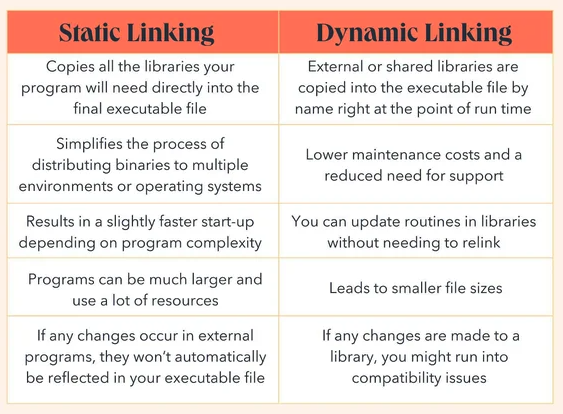
介绍 #
程序函数库可分为3种类型:静态函数库(static libraries)、共享函数库(shared libraries)、动态加载函数库(dynamically loaded libraries):
- 静态函数库,是在程序执行前就加入到目标程序中去了 ;
- 动态函数库同共享函数库是一个东西(在linux上叫共享对象库, 文件后缀是.so ,windows上叫动态加载函数库, 文件后缀是.dll)
linux中命名系统的共享库的规则

代码实现 #
/* libhello.c - demonstrate library use. */
#include <stdio.h>

void hello(void) {
    printf("Hello, library world.\n");
}
/* libhello.h - demonstrate library use. */ void hello(void);/* demo_use.c -- demonstrate direct use of the "hello" routine */ #include "libhello.h" int main(void) { hello(); return 0; }# Static library demo # Create static library's object file, libhello-static.o. # I'm using the name libhello-static to clearly # differentiate the static library from the # dynamic library examples, but you don't need to use # "-static" in the names of your # object files or static libraries. # -Wall: 这个选项会开启编译器的所有警告信息。它告诉编译器在编译过程中显示尽可能多的警告,帮助开发者发现潜在的问题。 # -g: 这个选项生成用于调试的额外信息,包括源代码中的行号、变量名称等。这些信息会被包含在目标文件中,便于调试程序。 # -c: 这个选项告诉编译器只进行编译,而不进行链接。它会将源文件编译成目标文件,但不会生成可执行文件。 gcc -Wall -g -c -o libhello-static.o libhello.c # Create static library. ar rcs libhello-static.a libhello-static.o # At this point we could just copy libhello-static.a # somewhere else to use it. # For demo purposes, we'll just keep the library # in the current directory. # Compile demo_use program file. gcc -Wall -g -c demo_use.c -o demo_use.o # Create demo_use program; -L. causes "." to be searched during # creation of the program. Note that this command causes # the relevant object file in libhello-static.a to be # incorporated into file demo_use_static. # -L.: 这个选项告诉链接器在当前目录 (.) 中查找库文件。 # -lhello-static: 这个选项告诉链接器要链接名为 libhello-static.a 或 libhello-static.so 的库文件。 gcc -g -o demo_use_static demo_use.o -L. -lhello-static # Execute the program. ./demo_use_staticstatic 中 删除中间对象,比如
rm -f libhello-static.a libhello-static.o后,编译出来的 demo_use_static也可以正常执行。
ar 归档工具的作用就是将多个.o文件压缩到一个.a文件中(包括一些额外的元信息)。方便使用 -l 对.a、.o文件进行链接。
⫸ 如果只有单个.o文件的话,直接链接,不使用任何参数:gcc -g -o main demo_use.o libhello-static.o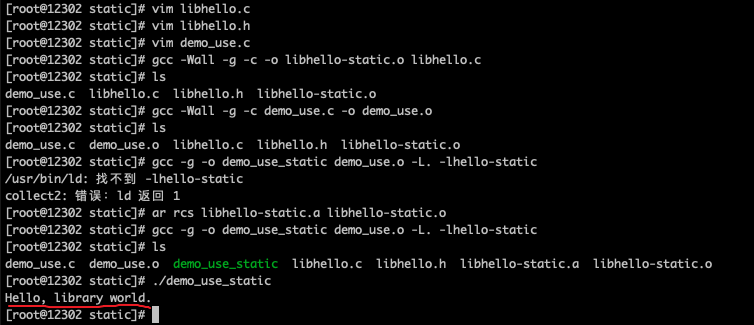

# Shared library demo
# Create shared library's object file, libhello.o.

# -fPIC: 这个选项告诉编译器生成位置独立的代码[位置无关](Position Independent Code)。生成的代码可在内存中的任何位置运行,通常用于动态链接库(如共享库)的生成。
gcc -fPIC -Wall -g -c libhello.c

# Create shared library.
# Use -lc to link it against C library, since libhello
# depends on the C library.

# -g: 这个选项生成用于调试的额外信息,包括源代码中的行号、变量名称等。这些信息会被包含在目标文件中,便于调试程序。
# -shared: 这个选项告诉编译器生成一个共享库。
# -Wl,-soname,libhello.so.0: -Wl 是传递选项给链接器的方式。-soname 选项设置共享库的 soname(符号名)。这里指定了 libhello.so.0 作为 soname。
# -o libhello.so.0.0: 这个选项指定生成的共享库文件名为 libhello.so.0.0。
# libhello.o: 这是要链接的目标文件的名称(libhello.o)。
# -lc: 这个选项告诉链接器(ld)在链接时需要链接 C 标准库(libc.so)。
# 综合起来,这条命令告诉编译器 gcc 使用 -g 选项生成共享库,并指定共享库的 soname 为 libhello.so.0,然后将 libhello.o 目标文件链接到一个名为 libhello.so.0.0 的共享库中,并将 C 标准库链接到生成的共享库中。
gcc -g -shared -Wl,-soname,libhello.so.0  -o libhello.so.0.0 libhello.o -lc

# At this point we could just copy libhello.so.0.0 into
# some directory, say /usr/local/lib.

# Now we need to call ldconfig to fix up the symbolic links.

# Set up the soname.  We could just execute:
# ln -sf libhello.so.0.0 libhello.so.0
# but let's let ldconfig figure it out.

# /sbin/ldconfig 命令用于配置动态链接器运行时的链接库。在这个命令中,-n 选项告诉 ldconfig 不要实际更改系统配置,而是显示将要执行的操作。
# . 表示当前目录。ldconfig 命令在运行时会扫描指定的目录,查找可执行文件需要的共享库,并更新系统的共享库缓存,使得系统能够正确地找到和链接这些共享库。
# 但是在这个命令中,由于使用了 -n 选项,它只是展示了在当前目录运行 ldconfig 实际会执行的操作,而不会实际执行更新系统共享库缓存的操作。

# 以上解释应该是有问题的。实际情况是 生成了一个 libhello.so.0的软连接
/sbin/ldconfig -n .

# Set up the linker name.
# In a more sophisticated setting, we'd need to make
# sure that if there was an existing linker name,
# and if so, check if it should stay or not.

ln -sf libhello.so.0 libhello.so

# Compile demo_use program file.

gcc -Wall -g -c demo_use.c -o demo_use.o

# Create program demo_use.
# The -L. causes "." to be searched during creation
# of the program; note that this does NOT mean that "."
# will be searched when the program is executed.

gcc -g -o demo_use demo_use.o -L. -lhello

# Execute the program.  Note that we need to tell the program
# where the shared library is, using LD_LIBRARY_PATH.

LD_LIBRARY_PATH="." ./demo_use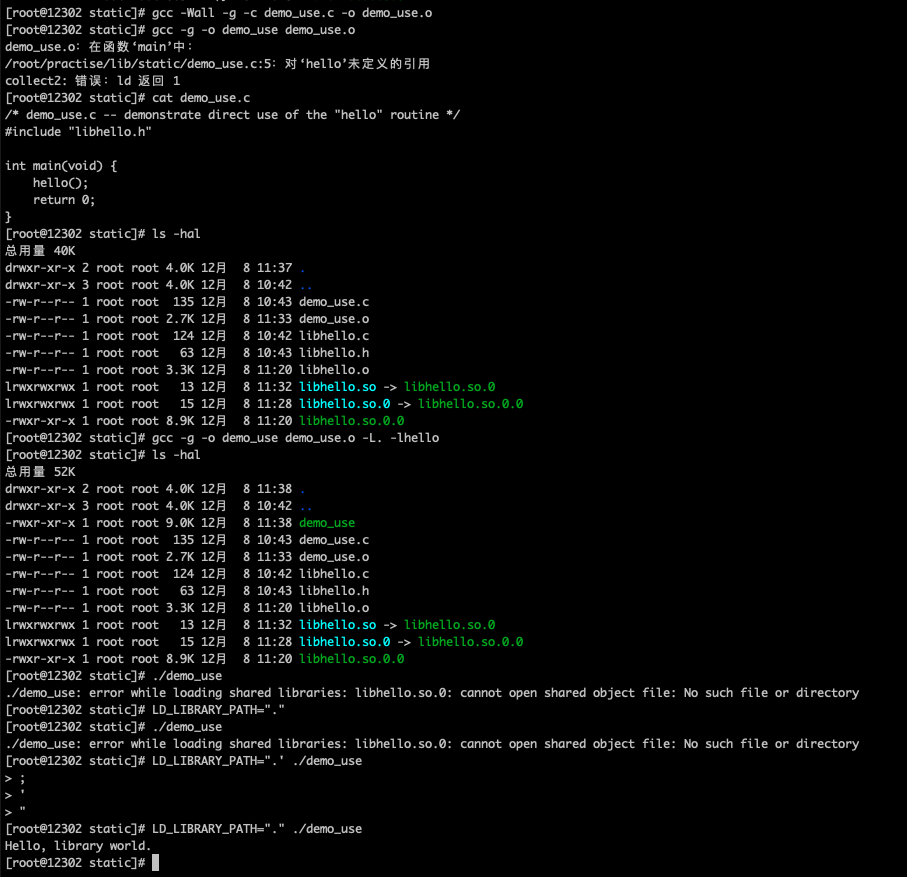
# Shared library demo # Create shared library's object file, libhello.o. # 1. 编译生成目标文件 # 在 macOS 上不需要显式指定 -fPIC,因为 Clang 默认生成的就是位置无关代码。 clang -Wall -g -c libhello.c # 2. 创建动态库 # 使用 -dynamiclib 标志来生成 macOS 原生的动态库。同时使用 -install_name 来设置“安装名称”(相当于 Linux 中的 soname),这决定了程序在运行时会去哪里寻找这个库。 # 没有 -install_name 默认 libhello.dylib # clang -g -dynamiclib [-install_name @rpath/libhello.dylib] -o libhello.dylib libhello.o -lc clang -g -dynamiclib -o libhello.dylib libhello.o -lc # 3. 编译调用程序 clang -Wall -g -c demo_use.c -o demo_use.o # 4. 链接动态库,-L. 告诉链接器在当前目录找库 clang -g -o demo_use demo_use.o -L. -lhello # issue # ./demo_use 运行报错:dyld[43042]: Library not loaded: @rpath/libhello.dylib Referenced from: ... , Reason: no LC_RPATH's found # ① 重新编译可执行文件并添加 RPATH # 既然你的动态库和可执行文件都在当前目录下,你可以在编译 demo_use 时,通过 -Wl,-rpath,@loader_path 参数将“当前目录”加入运行时搜索路径。@loader_path 代表可执行文件自身所在的目录。 clang -g -o demo_use demo_use.o -L. -lhello -Wl,-rpath,@loader_path # ② 使用 install_name_tool 补救(无需重新编译) # 如果你不想重新编译代码,可以使用 macOS 自带的命令行工具 install_name_tool,直接向已生成的二进制文件中追加一个运行时搜索路径(LC_RPATH)。 # 使用`otool -l ./demo_use | grep -A2 LC_RPATH`,此时你应该能看到新增的 rpath 路径信息了。 install_name_tool -add_rpath . ./demo_use/* demo_dynamic.c -- demonstrate dynamic loading and use of the "hello" routine */ /* Need dlfcn.h for the routines to dynamically load libraries */ #include <dlfcn.h> #include <stdlib.h> #include <stdio.h> /* Note that we don't have to include "libhello.h". However, we do need to specify something related; we need to specify a type that will hold the value we're going to get from dlsym(). */ /* The type "simple_demo_function" describes a function that takes no arguments, and returns no value: */ typedef void (*simple_demo_function)(void); int main(void) { const char *error; void *module; simple_demo_function demo_function; /* Load dynamically loaded library */ module = dlopen("libhello.so", RTLD_LAZY); if (!module) { fprintf(stderr, "Couldn't open libhello.so: %s\n", dlerror()); exit(1); } /* Get symbol */ dlerror(); demo_function = dlsym(module, "hello"); if ((error = dlerror())) { fprintf(stderr, "Couldn't find hello: %s\n", error); exit(1); } /* Now call the function in the DL library */ (*demo_function)(); /* All done, close things cleanly */ dlclose(module); return 0; }#!/bin/sh # Dynamically loaded library demo # Presume that libhello.so and friends have been created (see dynamic example). # Compile demo_dynamic program file into an object file. gcc -Wall -g -c demo_dynamic.c # Create program demo_use. # Note that we don't have to tell it where to search for DL libraries, # since the only special library this program uses won't be loaded until after the program starts up. # However, we DO need the option -ldl to include the library that loads the DL libraries. gcc -g -o demo_dynamic demo_dynamic.o -ldl # Execute the program. Note that we need to tell the # program where get the dynamically loaded library, # using LD_LIBRARY_PATH. LD_LIBRARY_PATH="." ./demo_dynamic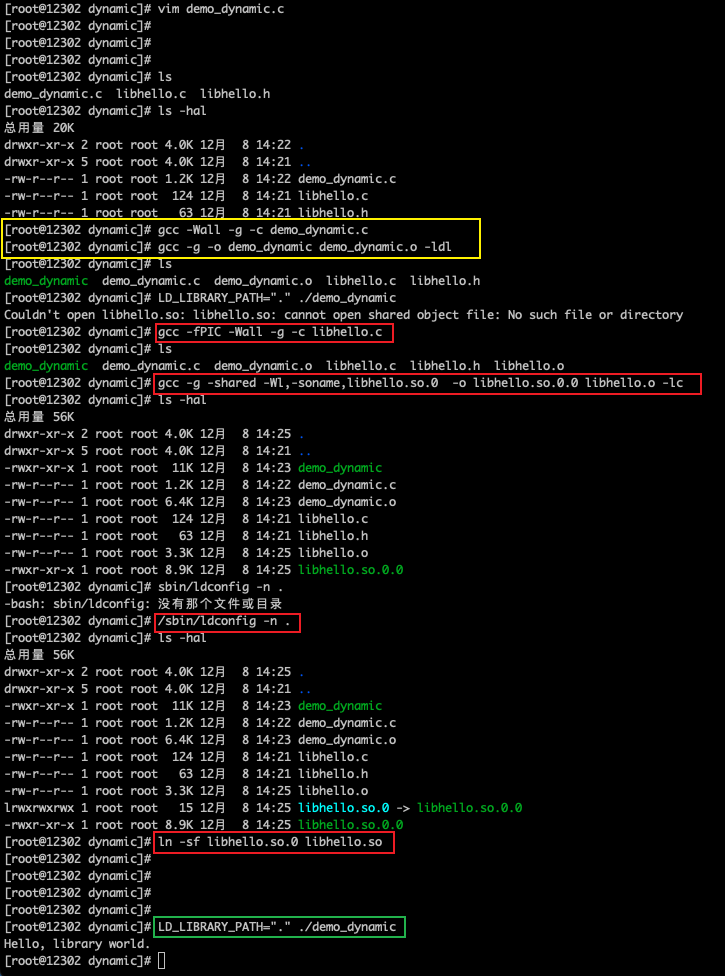
Reference #
comments powered by Disqus